

Installation & Setup
1. Install the GitHub App
The Blame GitHub App grants read access to analyze code diffs and write access to post inline review comments. Log in to your Blame Dashboard and head to Repositories (or complete the initial setup wizard). Click Connect GitHub App or Add Repositories. In GitHub, select the personal account or organization where you wish to install Blame. Choose your repository permissions:- All repositories: Automatically grants access to current and future repos.
- Only select repositories: Manually select specific repositories to review.
Enabling Repositories
Once authorized, your available repositories will appear in your workspace. Go to Repositories. Toggle the switch next to any repository you want Blame to automatically review, or click Enable All. When a repository is enabled for the first time, Blame builds an initial Tree-Sitter AST index to map cross-file dependencies and internal architectural symbols.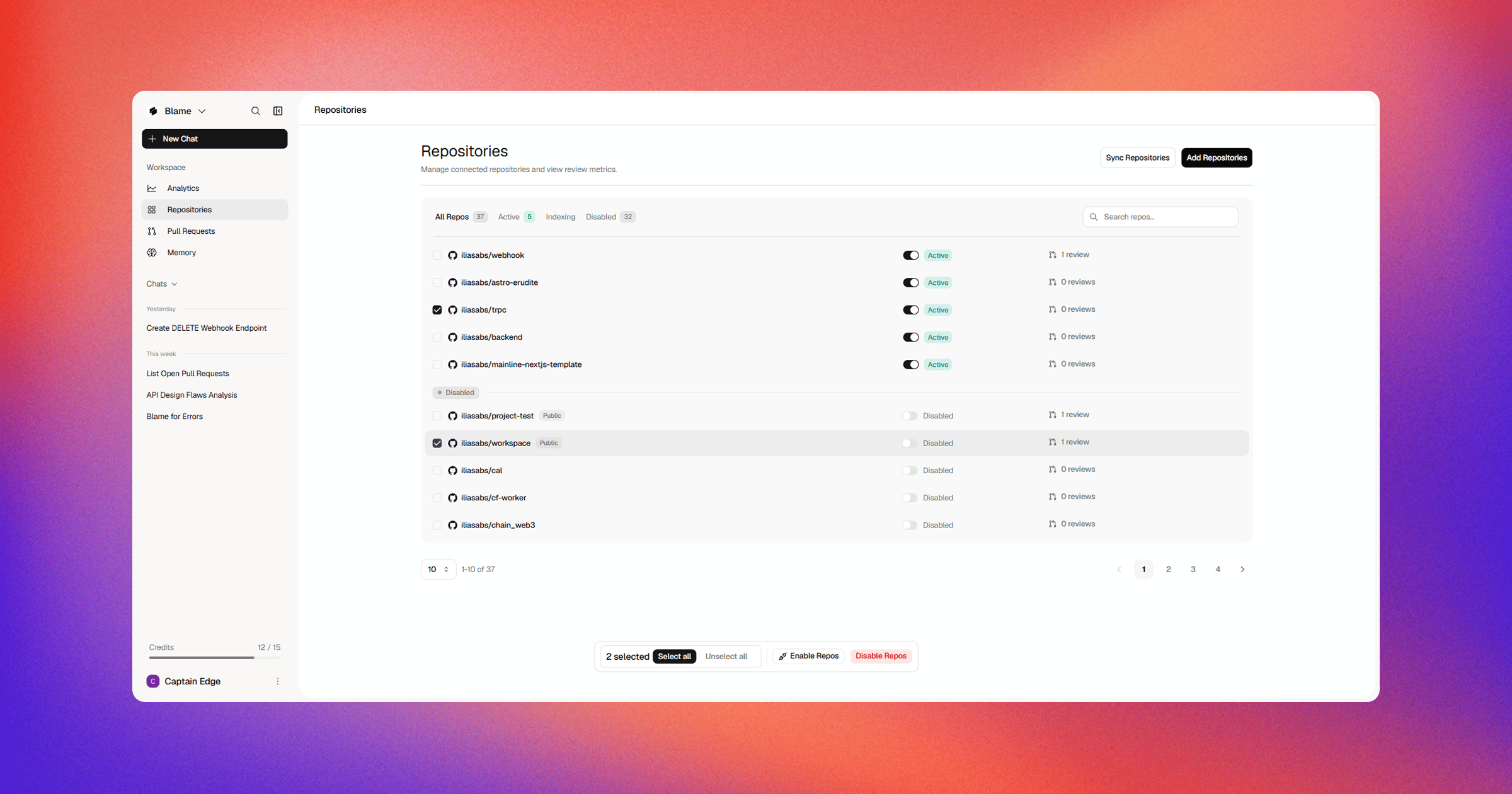
Review Behavior & Customization
Customize review frequency and strictness under Repository Settings.Review Triggers
Choose when Blame initiates a review:- On PR Opened: Runs immediately upon PR creation.
- On New Commits / Synchronize: Re-evaluates whenever new commits are pushed.
- Draft PRs: Toggle whether to evaluate drafts before they are marked ready for review.
Review Strictness
Fine-tune review feedback density:- Low (Comprehensive): Flags all architectural, security, performance, and style issues.
- Medium (Balanced): Prioritizes logic defects, security vulnerabilities, and high-impact warnings.
- High (Critical Only): Strict focus solely on P0/P1 defects and breaking API changes.
Create Your First Test PR
Verify your setup with a live pull request. Create a test branch with a small code change in an enabled repository and open a pull request on GitHub. Blame analyzes the diff against full repository context and posts a comprehensive review comment with inline diff suggestions. You can also manually trigger a review at any time by commenting@blame review on any GitHub pull request or clicking Trigger Review inside the Blame PR Feed.
What’s Next?
- Train Blame on your team’s code conventions, style guides, and architectural patterns.
- Track review time saved, merge velocity, and defect resolution rates.
- Receive instant summaries and critical bug alerts in your team channels.